Omarchy · x86_64 · Preview
fab for Omarchy. Hold F5, talk, let go.
Our take on dictation for Omarchy. Your words land in the window you were in, terminal or not. The microphone, the model and the transcription all stay on this machine.
Keys
Five keys, all in Super K.
- F5Hold to talk, let go to paste. Settings can make it a tap instead.
- ⇧F5Cancel the take. Nothing is pasted.
- F6Grab an area of the screen.
- ⇧F6Grab the focused window.
- ⌃F6Grab the whole screen.
-- ~/.config/hypr/bindings.lua, written by setup
o.bind("F5", "Fab: Dictate (hold or tap)",
  "fab-linux take press")
o.bind("F5", "Fab: Finish dictation (release)",
  "fab-linux take release", { release = true })
o.bind("SHIFT + F5", "Fab: Cancel dictation",
  "fab-linux take cancel")
Where it lands
Back in the window you were in.
- In a terminal
- pasted with ctrl+shift+v
- Anywhere else
- pasted with ctrl+v
- If the focus moved
- kept on the clipboard, and a notification says so
- Your clipboard
- put back the way it was
On screen
A small strip while you talk.
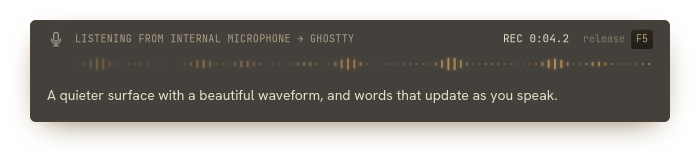
From the Linux app. The levels and the sentence are samples.
The mic, the window you’re talking into, a timer, a waveform, and your words as they come. Three looks, gray or amber, with size, opacity and sensitivity in Settings. It sits at the bottom of the screen and never takes focus.
Grab
Point at the screen, mark it up.
The editor’s keys
- PPen
- AArrow
- RBox
- EEllipse
- TText
- HHighlight
- BRedact
- CCrop
Install
Get it.
The package isn’t up yet. The install command will show here when it is.
01
Install
The package installs fab and opens Settings. Later it’s “fab” in the launcher.
02
Set it up
Press Set up dictation. It picks a free key, downloads the speech model once, about 670 MB, and checks your microphone.
03
Talk
Hold the key, speak, let go. The words show up where you were typing. Shift plus the key cancels.
Questions
The short answers.
What does it need?+
Omarchy on an x86_64 machine and a microphone. The installer brings everything else, and Settings downloads the speech model once (about 670 MB).
Does my voice leave the machine?+
No. The microphone, the speech model and the transcription all run on this computer. After the model is downloaded, a take needs no network.
What if F5 is already taken?+
Setup only uses a key that is free, and never replaces another app’s shortcut. Pick a different one in Settings.
Do I need a Mac?+
No. If you also use fab on a Mac, you can pair the two with four words and talk through either one. That part is optional.
Something isn’t working.+
Run fab-linux doctor. It checks the services, the model, the shortcut and the microphone without recording. doctor --fix repairs what it can.